Linux Shell Program - expr
Linux 下的 Shell 编程之表达式。
Difference between let, expr and $[]
命令行执行运算表达式:
$ expr 5 + 1
6

$ $(expr 5 + 1)
zsh: command not found: 6

$ $[5 + 1]
zsh: command not found: 6

$ $((5+1))
zsh: command not found: 6
如果想在命令行执行数学计算,建议使用数学计算器
bc(bash calculator)。
在 bash shell 脚本中有以下几种运算表达式的书写方式。
expr#
$ man expr

NAME
     expr – evaluate expression

SYNOPSIS
     expr expression

DESCRIPTION
     The expr utility evaluates expression and writes the result on standard output.
最开始,Bourne shell 提供了一个特别的命令用来处理数学表达式。
expr 命令允许在命令行上处理数学表达式,但是特别笨拙。
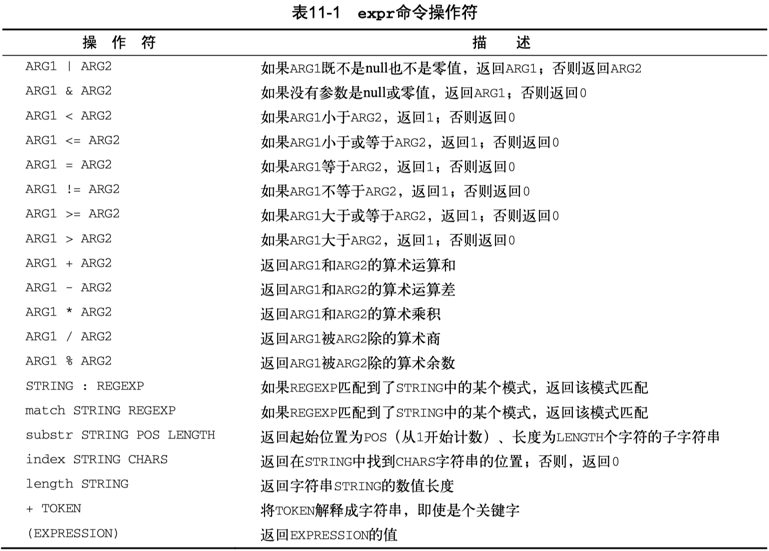
expr 命令能够识别少数的数学和字符串操作符,见表11-1。
Note
expr 中的 expression 表达式需要注意两点:
- 操作符两侧需要空格隔开算子;
- 算子引用变量需要用美元符号
$;
expr expression 的退出状态(EXIT STATUS)和 expression 的结果刚好相反:
EXIT STATUS
     The expr utility exits with one of the following values:
     0       the expression is neither an empty string nor 0.
     1       the expression is an empty string or 0.
     2       the expression is invalid.
数值比较#
数值比较:比较结果和退出状态刚好相反。
- expression 为真时,return 1,EXIT STATUS=0(true);
- expression 为假时,return 0,EXIT STATUS=1(false)。
$ n=5
# result of expression
$ expr $n = 5
1
# exit status of expr
$ echo $?
0
# result of expression
$ expr $n != 5
0
# exit status of expr
$ echo $?
1

# 大于号、小于号需要转义,以区分重定向
$ expr $n \> 3
1
$ expr $n \< 6
1
条件判断#
if expr $n \< 3; then
    echo "lt 3"
elif expr $n \> 6; then
    echo "gt 6"
elif expr $n = 5; then
    echo "eq 5"
else
    echo "neq 5"
fi
注意:每个 expr 表达式都会输出比较结果,expr $n = 5 为真返回 1,退出状态码=0,进入 elif 分支。
数值计算#
# echo $(expr 5 + 1)
$ x=$(expr 5 + 1)
$ echo $x
6

#星号需要转义
# echo `expr 5 \* 2`
$ y=`expr 5 \* 2`
$ echo $y
10
基于 expr 表达式实现 for 循环中记录递增的索引:
综合示例#
#!/bin/bash

$ var1=5
$ var2=1
$ x=$var1+$var2
$ echo "x=$x"
x=5+1

$ y=$(expr $var1+$var2)
$ echo "y=$y"
y=5+1

$ z=$(expr $var1 + $var2)
$ echo "z=$z"
z=6
前两种运算符与算子之间没有空格,被当成了字符串拼接。
第三种是正确的 expr 算术表达式写法,结果符合预期。
$[]#
bash shell 为了保持与 Bourne shell 的兼容而包含了 expr 命令,但同时提供了一种更简单的方法来执行数学表达式。
在 bash 中,在将一个数学运算结果赋给某个变量时,可以用美元符号和方括号($[operation])将数学表达式围起来。
用方括号执行 shell 数学运算比用 expr 命令方便很多。
- 操作符两侧非必须要用空格隔开算子;
- 算子可直接引用变量,无需美元符号;
数值比较#
条件判断#
基于中括号的 test 条件判断:
if [ $n -lt 3 ]; then
    echo "lt 3"
elif [ $n -gt 6 ]; then
    echo "gt 6"
elif [ $n -eq 5 ]; then
    echo "eq 5"
else
    echo "neq 5"
fi
数值计算#
计算表达式:
综合示例#
用 $[] 表达式实现 for 循环中记录递增的索引:
在使用方括号来执行运算时,不用担心 shell 会误解运算符号。
方括号中的星号,会被 shell 解析为数学中的乘法运算符。
$ var1=100
$ var2=50
$ var3=45
$ # var4=$[$var1 * ($var2 - $var3)]
$ var4=$[var1*(var2-var3)] # 简写
$ echo The final result is $var4
The final result is 500
无论是 expr 表达式,还是中括号运算式,bash shell 数学运算符只支持整数运算。
$ var1=100
$ var2=45
$ var3=$(expr $var1 / $var2)
$ echo The final result is $var3
2
$ var4=$[var1/var2]
$ echo The final result is $var4
2
如果需要在shell脚本中进行浮点数运算,可以考虑看看 z shell,zsh 提供了完整的浮点数算术操作。
也可将表达式重定向到 bash 内置计算器 bc 做计算,参考 REDIRECTION 相关议题。
let#
let command performs arithmetic evaluation and is a shell built-in.
let expressionis exactly equivalent to(( expression )). Regarding the operations (ARITHMETIC EVALUATION) it supports, refer to the double bracket expressions below.
$ man bash

SHELL BUILTIN COMMANDS

       let arg [arg ...]
              Each arg is an arithmetic expression to be evaluated (see ARITHMETIC EVALUATION).  If the
              last arg evaluates to 0, let returns 1; 0 is returned otherwise.
bash shell 内置的 let 表达式,支持直接引用变量,无需美元符号解引用,算子之间无需强制空格,更接近于 C 等现代编程语言里面的代数表达式。
数值比较#
let 进行数值比较时,默认不输出比较结果:
可以用一个变量承接比较结果:
$ let eq=n==5; echo $eq
1
$ let neq=n!=5; echo $neq
0

# let gt=n\>3; echo $gt
$ let "gt=n>3"; echo $gt
1
# let lt=n\<6; echo $lt
$ let "lt=n<6"; echo $lt
1
同 expr 表达式一样,其运算结果和退出状态也是相反。
条件判断#
- 最终只输出
eq 5,不输出比较结果。 - 大于号、小于号无需转义,比较方便。
if let "n < 3"; then
    echo "lt 3"
elif let "n > 6"; then
    echo "gt 6"
elif let n==5; then
    echo "eq 5"
else
    echo "neq 5"
fi
数值计算#
数值计算:let var3=var1+var2
$ z=0
# 等效: let z+=3, let "z += 3"
$ let z=z+3; echo "z = $z"
6

$ let sum=10+1; echo $sum
sum = 11

# 支持幂运算:let x=2\*\*3
$ let "x=2**3"; echo $x
8
let 后面可以同时放置多个以空格分割的表达式:
综合示例#
相比 expr 表达式,let 表达式更自然,推荐使用。
使用 let 表达式实现 for 循环中记录递增的索引:
$ i=0
$ let index=i+1
$ echo $i $index
0 1

# 支持C语言格式的自增运算符
$ let i++; echo $i
1

$ let i+=1; echo $i
2

$ let index=i++; echo $i $index
3 2

$ let index=++i; echo $i $index
4 4
(())#
双括号命令 (( expression )) 基本与 let expression 等价。
双括号表达式有状态返回码,当运算结果非零时,返回0;否则,返回1。
相比 test 命令只能使用简单的算术操作,双括号命令允许在比较过程中使用高级数学表达式。
$ man bash

((expression))

The expression is evaluated according to the rules described below under ARITHMETIC EVALUATION. If the value of the expression is non-zero, the return status is 0; otherwise the return status is 1. This is exactly equivalent to let "expression".
- Shell Check SC2219: Instead of
letexpr, prefer(( expr )).
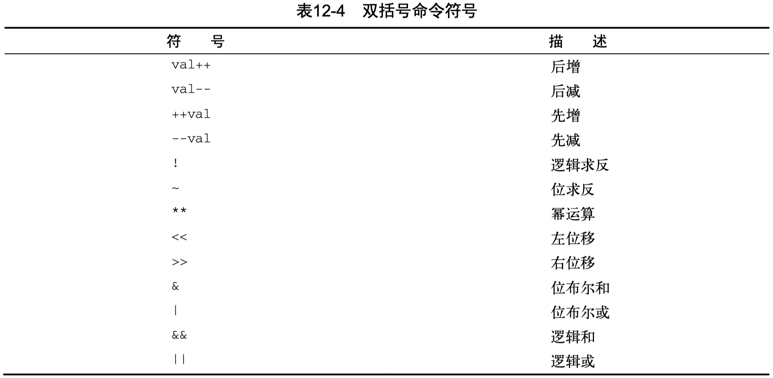
表12-4列出了双括号命令中会用到的其他运算符:
数值比较#
条件判断#
if ((n<3)); then
    echo "lt 3"
elif ((n>6)); then
    echo "gt 6"
elif ((n==5)); then
    echo "eq 5"
else
    echo "not eq 5"
fi
数值计算#
#!/bin/bash

n=0
(( n += 1 )) # Increment
echo $? # 返回0
(( n -= 1))
echo $? # 返回1
echo "n = $n"

val1=10

if (( $val1 ** 2 > 90 ))
then (( val2 = $val1 ** 2 ))
    echo "The square of $val1 is $val2"
fi
关于双括号的场景,参考bash中C语言风格的for循环格式:
注意:有些部分并没有遵循bash shell标准的for命令:
- 变量赋值可以有空格
- 条件中的变量不以美元符开头
- 迭代过程的算式未用 expr 命令格式
综合示例#
在 Linux Command - awk control 中的格式化输出(printf)
使用 awk 对 hexdump 第一列 offset 值添加地址偏移量(baddr)以便得到 address。
对于无前缀的十六进制格式化字符串 "%08_ax\t",需先添加 0x 前缀,并使用(("0x"$1))对字符串进行数值化。
$ got_offset=$(objdump -hw a.out | awk '/.got/{print "0x"$6}')
$ got_size=$(objdump -hw a.out | awk '/.got/{print "0x"$3}')
$ hexdump -v -s $got_offset -n $got_size -e '"%08_ax\t" /8 "%016x\t" "\n"' a.out \
| awk 'BEGIN{print "Offset\t\tAddress\t\t\t\tValue"} \
{printf("%s\t", $1); printf("%016x\t", (("0x"$1))+65536); print $2}'
Offset      Address             Value
00000f90    0000000000010f90    0000000000000000
00000f98    0000000000010f98    0000000000000000
00000fa0    0000000000010fa0    0000000000000000
00000fa8    0000000000010fa8    00000000000005d0
00000fb0    0000000000010fb0    00000000000005d0
00000fb8    0000000000010fb8    00000000000005d0
00000fc0    0000000000010fc0    00000000000005d0
00000fc8    0000000000010fc8    00000000000005d0
00000fd0    0000000000010fd0    0000000000010da0
00000fd8    0000000000010fd8    0000000000000000
00000fe0    0000000000010fe0    0000000000000000
00000fe8    0000000000010fe8    0000000000000000
00000ff0    0000000000010ff0    0000000000000754
00000ff8    0000000000010ff8    0000000000000000
$(())#
在 dash shell、z shell 脚本中执行算术运算的正确格式是用双圆括号方法 —— $((expression))。
# man bash
   Arithmetic Expansion
       Arithmetic expansion allows the evaluation of an arithmetic expression and the substitu-
       tion of the result.  The format for arithmetic expansion is:

              $((expression))

       The  expression is treated as if it were within double quotes, but a double quote inside
       the parentheses is not treated specially.  All tokens in the expression undergo  parame-
       ter  expansion,  string  expansion, command substitution, and quote removal.  Arithmetic
       expansions may be nested.

       The evaluation is performed according to the rules listed below under ARITHMETIC EVALUA-
       TION.  If expression is invalid, bash prints a message indicating failure and no substi-
       tution occurs.
state-of-art#
根据 Shell Check 建议,在做数学运算时,应采用 $(()) 代替 expr 和 let 表达式以及 $[ ]。
- SC2003:
expris antiquated. Consider rewriting this using$((..)),${}or[[ ]]. - SC2007: Use
$((..))instead of deprecated$[..].
注意:双括号中的表达式,解引用变量时可不添加美元符号。
Within double parentheses, parameter dereferencing is optional.
表达式 OPTIND=$(($OPTIND + 1)) 将被 ShellCheck 检测报错 C2004: $/${} is unnecessary on arithmetic variables. 应修改为 OPTIND=$((OPTIND + 1))。
示例:
以下用 (( expr )) 表达式实现 for 循环中记录递增的索引:
综合示例#
减法计算间隔耗时:
$ time_start=1668913082; time_end=1668913195
$ time_cost=$((time_end-time_start))
$ echo $time_cost
113
乘法计算倍积:
双乘计算幂:
浮点数乘法,printf 可限定输出浮点位数:
整除取模运算:
取模和取余运算:
$ value1=10
$ value2=$(( $value1 / 3 ))
$ echo $value2
3
$ value3=$(( $value1 % 3 ))
$ echo $value3
1
将被除数浮点化,以便计算完整的浮点除法结果:
$ value1=10
$ value2=$(( $value1 / 3. ))
$ echo $value2
3.3333333333333335
$ printf "%.3f\n" $value2
3.333
实际案例#
readelf -SW test-gdb 读取其中的 section .interp 的 Offset=0x000238, size=0x00001b。
$ readelf -SW test-gdb

Section Headers:
  [Nr] Name              Type            Address          Off    Size   ES Flg Lk Inf Al
  [ 0]                   NULL            0000000000000000 000000 000000 00      0   0  0
  [ 1] .interp           PROGBITS        0000000000000238 000238 00001b 00   A  0   0  1

  [11] .init             PROGBITS        00000000000005b8 0005b8 000018 00  AX  0   0  4

  [26] .strtab           STRTAB          0000000000000000 001898 000237 00      0   0  1
  [27] .shstrtab         STRTAB          0000000000000000 001acf 0000fa 00      0   0  1
调用 od(octal dump) 和 hd(hex dump) 工具均可打印其内容:
$ od -j 0x000238 -N 0x00001b -S 3 test-gdb
0001070 /lib/ld-linux-aarch64.so.1
$ hd -s 0x000238 -n 0x00001b test-gdb
00000238  2f 6c 69 62 2f 6c 64 2d  6c 69 6e 75 78 2d 61 61  |/lib/ld-linux-aa|
00000248  72 63 68 36 34 2e 73 6f  2e 31 00                 |rch64.so.1.|
00000253
假设我们不想要 od 和 hd 开头的偏移量,只想打印纯净的 bytearray 对应的字符串(strings),可以考虑使用 head+tail+strings:
$ head -c 0x000238+0x00001b test-gdb | tail -c 0x00001b | strings
head: invalid number of bytes: ‘0x000238+0x00001b’
tail: invalid number of bytes: ‘0x00001b’
报错显示 head/tail 的 -c 选项参数不支持十六进制,只支持十进制。
可以将十六进制表达式用 $(()) 包围起来解决该问题:
$ head -c $((0x000238+0x00001b)) test-gdb | tail -c $((0x00001b)) | strings
/lib/ld-linux-aarch64.so.1
另外,我们可以使用 objdump -j .init -d test-gdb 来反汇编指定的 section .init。
另一种方式是指定地址范围 [--start-address, --stop-address),但这两个选项参数同样只认十进制。
$ objdump -d --start-address=0x5b8 --stop-address=0x5b8+0x18 test-gdb
objdump: --stop-address: bad number: 0x5b8+0x18
可以将计算结束地址的十六进制表达式用 $(()) 包围起来解决该问题:
$ objdump -d --start-address=0x5b8 --stop-address=$((0x5b8+0x18)) test-gdb

test-gdb:     file format elf64-littleaarch64


Disassembly of section .init:

00000000000005b8 <_init>:
 5b8:   d503201f    nop
 5bc:   a9bf7bfd    stp x29, x30, [sp, #-16]!
 5c0:   910003fd    mov x29, sp
 5c4:   9400002c    bl  674 <call_weak_fn>
 5c8:   a8c17bfd    ldp x29, x30, [sp], #16
 5cc:   d65f03c0    ret